
CRM vs Spreadsheet: Choosing the Right Foundation for Your Australian Business

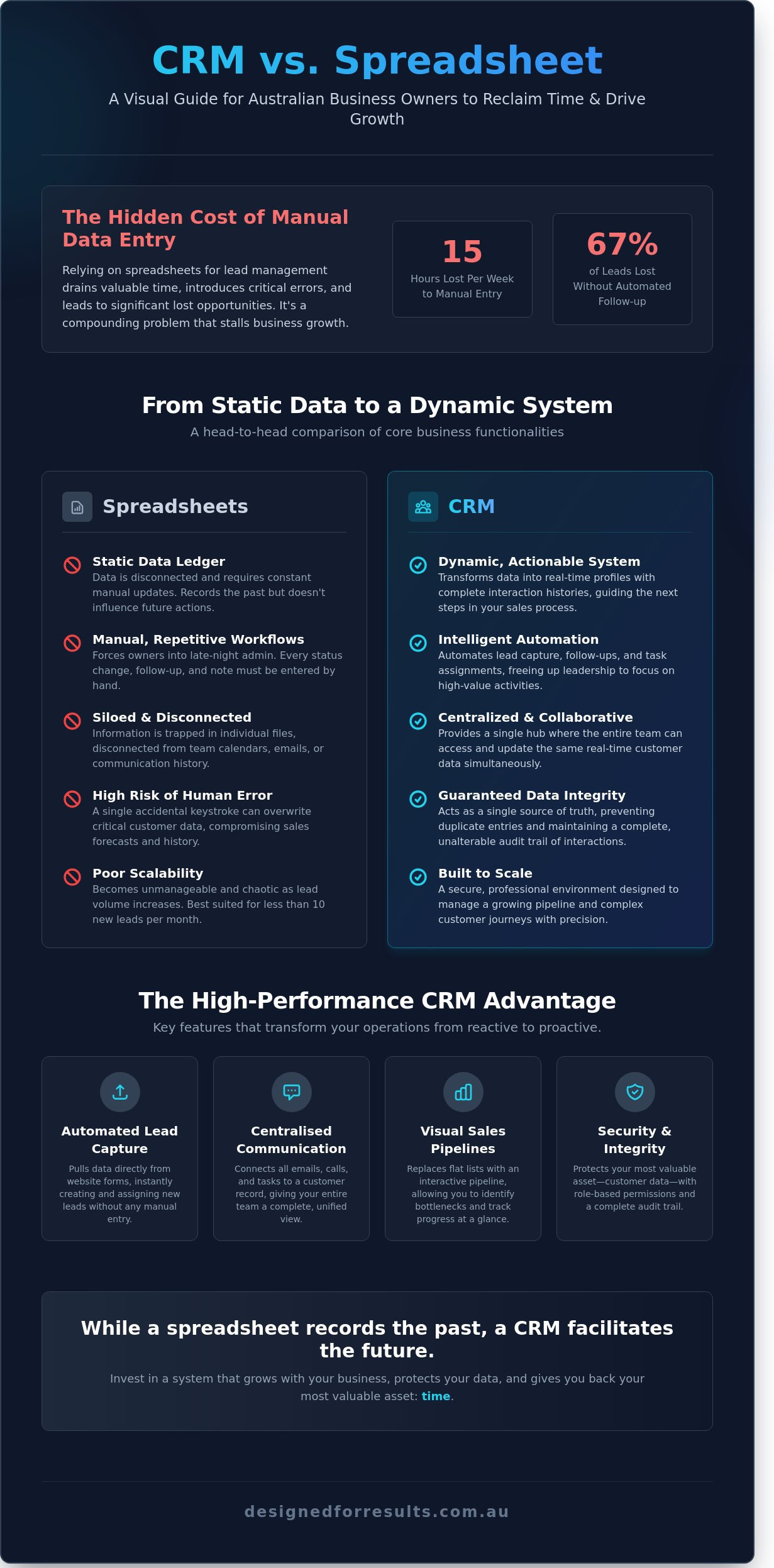
How many Australian business owners lose 15 hours every week to manual data entry simply because their current system cannot scale? You likely rely on a spreadsheet to track your leads; it's a familiar tool that serves many businesses well in their early stages. However, relying on manual updates often leads to missed opportunities, with data indicating that 67% of leads fall through the cracks without an automated follow-up system. Managing these files often forces you into late-night administrative sessions that drain your leadership capability and stall your progress.
Understanding the functional differences in the crm vs spreadsheet debate is essential for reclaiming your time and securing your lead pipeline. You'll learn how to replace repetitive tasks with automated workflows that drive measurable outcomes and increase your revenue. This guide provides a clear path to transition from manual data entry to a high-performance system that manages your sales pipeline with professional precision.
Defining the Role of Spreadsheets and CRMs in Modern Business
Australian business owners often reach a critical crossroads when managing lead data. Selecting the right foundation involves a direct comparison of crm vs spreadsheet capabilities. A spreadsheet serves as a versatile digital ledger designed for numerical analysis and static storage. It remains a practical starting point for businesses handling fewer than 10 new leads per month. As volume increases, the limitations of static documents become apparent. A Customer Relationship Management (CRM) system acts as a purpose-built hub to manage the entire lifecycle of a customer. It connects communication, tasks, and data in real time, ensuring that no quote or follow-up falls through the cracks.
Establishing a high-performance culture requires tools that support strategic alignment and measurable outcomes. While a spreadsheet records the past, a CRM facilitates the future. It provides a centralised environment where every interaction is logged, allowing for a seamless transition from lead acquisition to service delivery. This transition is vital for any Australian business aiming to reclaim time and reduce repetitive administrative burdens.
The Functional Purpose of a Spreadsheet
Spreadsheets provide a flexible canvas for custom calculations and one-off lists. They allow for rapid data entry without the need for complex software setup. This flexibility requires manual updates for every change in customer status. Data remains siloed within the individual file, disconnected from team calendars or email threads. This lack of integration often forces owners to work on admin during evenings to keep records current. Relying on manual entry creates a high risk of human error, which can compromise the accuracy of sales forecasts.
The Functional Purpose of a CRM
CRMs transform raw data into actionable profiles with complete interaction histories. They facilitate immediate collaboration by allowing multiple team members to access and update the same record simultaneously. Integrated tools enable owners to send emails or schedule appointments directly from the platform. This level of automation reduces repetitive administrative tasks; it allows leadership to focus on high-level management. Implementing bespoke automation ensures the customer journey remains consistent even as the business scales. Understanding the core differences in a crm vs spreadsheet comparison is essential for long-term operational efficiency.
- Centralised Hub: All team members view the same real-time data.
- Actionable Insights: Interaction histories guide the next step in the sales process.
- Reduced Admin: Automation handles follow-ups, giving the owner their time back.
Functional Differences: Static Data vs Dynamic Systems
Australian business owners often lose 28% of their working week to repetitive administrative tasks. This inefficiency usually stems from the tools used to manage customer information. A spreadsheet functions as a static ledger; it records what has happened but does nothing to influence what happens next. When comparing a crm vs spreadsheet, the primary distinction lies in the transition from manual observation to active automation.
Manual data entry in a spreadsheet is a hidden cost that compounds as a business grows. Every row added represents minutes of high-value time diverted from leadership or service delivery. A CRM eliminates this burden by capturing data at the source. It replaces flat, unresponsive lists with visual sales pipelines that reflect the actual state of the sales cycle. This visibility allows managers to identify bottlenecks immediately. While spreadsheets rely on static charts that require manual updates, modern CRMs provide real-time dashboards. These tools highlight the limitations of traditional CRM setups that lack automation, proving that staying competitive requires a system that updates itself as actions occur.
Automated Lead Capture and Management
A CRM pulls data directly from website contact forms to remove the need for manual entry. Inquiry details are instantly categorised and assigned to specific team members based on predefined rules. This ensures that no lead remains untouched while an owner is busy on-site or in meetings. Implementing lead follow up systems ensures that every prospect receives a timely response without requiring a staff member to manually update a spreadsheet cell. This level of responsiveness directly impacts conversion rates and revenue growth. If you are ready to reclaim your evenings from admin, let's chat about your current workflow.
Maintaining Data Integrity and Security
Data integrity is a significant risk in shared spreadsheets where a single accidental keystroke can overwrite critical customer history. CRMs protect the business by preventing duplicate entries and maintaining a single source of truth. Role-based permissions restrict sensitive information to authorised personnel only, ensuring privacy compliance. Every change made to a record is logged in an audit trail; this creates a transparent history of every interaction. This structure supports a high-performance culture where accountability is built into the system. The crm vs spreadsheet debate concludes when a business requires a secure, scalable environment that protects its most valuable asset: customer data.
Assessing the Hidden Operational Cost of Spreadsheets
Many Australian business owners view Excel or Google Sheets as a zero-cost solution. This perspective overlooks the significant drain on leadership resources and bottom-line profitability. Research indicates that staff in small service businesses spend roughly 20% of their working week on repetitive administrative tasks. For an owner, this equates to 8 to 10 hours every week spent manually updating rows rather than focusing on high-value client work or business development.
The crm vs spreadsheet debate often centres on software fees, yet the real expense lies in "admin debt." Fragmented data across multiple tabs forces owners to spend their evenings reconciling records and chasing updates. This lack of automation prevents the business from scaling without hiring additional administrative staff. Every new client adds a linear increase in labour requirements, which eventually caps the business's capacity to grow.
The Time Cost of Manual Administration
Manual data entry creates repetitive admin loops that trap talented team members in low-value cycles. Australian businesses relying on static systems often lose 15 hours per month per employee to basic lead tracking and data cleanup. These hours represent a direct opportunity cost. Redirecting that time toward billable activities or client retention efforts generates measurable revenue growth. Implementing bespoke automation removes these bottlenecks, allowing the existing team to handle a 30% increase in volume without adding headcount.
Impact on Lead Conversion and Customer Journey
Speed is the primary driver of conversion in the service sector. A 2023 study found that businesses responding to enquiries within five minutes are 100 times more likely to connect than those waiting 30 minutes. Spreadsheets rely on manual checks, which naturally leads to delayed responses and missed opportunities. A CRM ensures a professional, standardised journey by triggering immediate follow-ups and centralising communication history. This visibility allows any team member to pick up a conversation with full context, honouring the customer's time and increasing the likelihood of a successful sale. Relying on a crm vs spreadsheet setup provides the infrastructure needed to maintain high standards as enquiry volumes rise.
Effective systems replace accidental outcomes with reliable results. Moving away from manual tracking provides the clarity needed to manage a high-performance operation and gives the business owner their evenings back.
Identifying the Tipping Point for CRM Implementation
Deciding between a crm vs spreadsheet becomes a priority when manual systems fail to support your revenue targets. Managing leads in a spreadsheet works for a solo operator. The moment a second team member requires access to that same data, the system begins to fracture under the weight of manual coordination. Australian businesses often hit this wall when they generate more than 15 new leads weekly. At this volume, a 40% drop-off in follow-up consistency typically occurs because the owner or manager is buried in administrative tasks.
Complexity in the sales cycle signals an immediate need for change. If your process requires multiple steps—such as discovery calls, site visits, and quote approvals—relying on memory or static cells leads to missed opportunities. Growth requires predictable outcomes. Transitioning to a dedicated system allows you to measure conversion rates at every stage, turning your sales process into a reliable asset rather than a series of lucky breaks.
Signs Your Business Has Outgrown Excel
Version control issues indicate your current system is failing. When multiple versions of the same spreadsheet circulate via email, no one possesses the current truth. You'll find client interaction history trapped in individual inboxes, leaving the business vulnerable if a staff member departs. Most telling is the time spent on reporting; if gathering monthly sales figures requires 5 hours of manual data manipulation, you're losing billable time to low-value admin.
Preparing for a Seamless Transition
Successful migration starts with a rigorous data audit. Delete outdated records and standardise formatting to ensure the new system remains clean from day one. Map your existing sales steps to identify where workflow automation can eliminate repetitive tasks like follow-up emails or quote reminders. Select a platform that supports your current team size while providing the capacity to scale as your lead volume increases. This preparation ensures the technology supports your team rather than creating more work.
If your manual systems are slowing your growth, book a consultation to discuss a more efficient way to manage your leads.
Optimising Performance Through CRM and Automation
A CRM provides the necessary infrastructure for sophisticated automation. Static files lack the connectivity to trigger workflows or manage complex customer journeys. Australian businesses adopting automated document generation save an average of 15 hours per month on contracts and proposals. These systems pull data directly from the record into a template, which eliminates manual entry errors and speeds up the sales cycle.
Intelligent systems reactivate old databases through targeted SMS and email campaigns. This process identifies opportunities within leads from 12 to 18 months ago that would otherwise remain ignored. Choosing a crm vs spreadsheet is a commitment to operational maturity. It allows the business owner to move away from evening admin and focus on high-level growth. This transition ensures that lead follow-up happens instantly, rather than waiting for a spare moment in a crowded schedule.
Integrating AI for Enhanced Efficiency
AI assistants qualify leads before they ever reach a human team member. This ensures your staff only handle prospects ready to buy. Automated booking systems sync directly with CRM data to remove scheduling friction. Voice agents and chatbots provide 24/7 coverage for an Australian business. This capability captures enquiries outside of standard office hours, ensuring no lead is lost to a competitor due to a slow response at 8 PM on a Tuesday.
Achieving Measurable Outcomes
Real-time sales dashboards provide immediate clarity on pipeline health. You can see the exact value of quotes outstanding and the conversion rate of every team member. Automation reduces the requirement for additional administrative staff as the business scales. A 2023 industry report found that businesses implementing bespoke AI automation reduced their overheads by 25% within the first year. Professional implementation ensures the system is tailored to your specific service model, delivering a clear return on investment and giving you your time back.
Transition to Scalable Systems for Your Australian Business
Relying on manual data entry costs the average Australian business owner 15 hours of administrative work every week. While spreadsheets serve a purpose during the initial startup phase, they quickly become a bottleneck that prevents consistent lead follow-up and timely quoting. The crm vs spreadsheet debate focuses on reclaiming your evenings and ensuring no revenue falls through the cracks. Implementing a CRM automates repetitive tasks and creates a seamless journey for your customers. Moving to a dynamic system reduces human error by 30% and ensures every lead receives a response within minutes.
Designed for Results specialises in Australian SME workflow automation and expert CRM implementation. We've helped local business owners reclaim up to 20 hours of their time each month through tailored systems and AI integration. Focus on high-level decisions that increase your profit margins while your systems handle the routine administration. Building a reliable foundation is the most effective way to handle more volume without increasing your headcount. It's about creating a business that runs effectively while you focus on leadership.
Book an automation strategy call to discuss your CRM needs and start building a more efficient operation today. You've built a successful business; now it's time to give yourself the freedom to lead it.
Frequently Asked Questions
Is a CRM better than Excel for a small business?
A CRM provides a centralised source of truth that static spreadsheets cannot match. While Excel is useful for basic calculations, it lacks the automation required to manage a growing Australian business effectively. When evaluating the crm vs spreadsheet dynamic, consider that a CRM allows teams to access real-time data. This shift reduces the 20% of time typically wasted on manual data entry and searching for client details.
Can I import my existing spreadsheet data into a CRM?
You can migrate your existing data by importing CSV or Excel files directly into most CRM platforms. This process involves mapping your spreadsheet columns to the corresponding fields in the new software to ensure data integrity. It's essential to clean your data first to remove duplicates. Research indicates that 25% of business databases contain errors that can hinder your initial setup efficiency and reporting accuracy.
How much time does it take to set up a CRM for an Australian business?
A standard CRM implementation for a small Australian business typically requires 2 to 5 days of focused configuration. This timeframe includes setting up user permissions, customising lead stages, and connecting essential communication tools like email. Complex systems with multiple third-party integrations may extend this process to 14 days. This ensures all automated workflows function correctly and provide the necessary visibility for your management team.
Do I need a CRM if I only have a few clients?
Implementing a CRM early ensures your business is ready to scale without administrative bottlenecks. Even with five active clients, a system tracks every interaction and upcoming task, preventing lost opportunities. It's about managing your pipeline effectively to ensure no lead is forgotten. Statistics show that 79% of marketing leads never convert into sales without a systematic follow-up process, making early adoption a logical step for growth.
What is the most cost-effective way to transition from spreadsheets?
Start with an entry-level tier of a reputable platform to keep initial costs under $30 per user monthly. This approach allows you to test the crm vs spreadsheet dynamic without a large upfront investment. Focus on automating one high-impact area first, such as lead capture or automated quoting, to see immediate returns. This strategy gives the owner their time back while proving the system's value before expanding features.
Can a CRM help with my Xero or accounting integrations?
Modern CRMs integrate directly with Xero to eliminate manual data entry between your sales and accounting departments. This connection ensures that when a deal is won, client details and invoice requirements flow through automatically to your ledger. Australian businesses using these integrations report a 30% reduction in administrative time spent on billing. It removes the need for evening admin sessions, allowing you to focus on high-level management.
What happens if my team finds a CRM too difficult to use?
Resistance usually stems from poor initial training or overly complex configurations that don't match your daily operations. Choose a platform with an intuitive interface and provide structured 60-minute training sessions for your team to ensure competence. High adoption rates are critical for success. Businesses with 90% user engagement see significantly better data accuracy and more reliable sales forecasts, leading to improved customer journeys and higher revenue.
How does CRM automation help with lead follow-up?
Automation sends immediate responses to enquiries, ensuring your business is the first to contact a potential client. It removes the burden of manual follow-ups, which often fall through the cracks when you are busy. Responding within 5 minutes increases your chances of qualifying a lead by 21 times compared to waiting 30 minutes. This level of responsiveness improves the customer journey and directly contributes to increased conversion rates.
