
Zapier vs Make: Choosing the Right Automation Platform for Your Australian Business in 2026

The most expensive automation platform isn't always the one with the highest price tag; it's the one that leaves your team manually fixing broken data entries every Tuesday morning. When comparing zapier vs make, the right choice depends on your specific workflow requirements and technical capacity. Managing an Australian business requires a focus on high-quality service. Yet, manual follow-up processes and evening spreadsheet sessions often consume the time needed for growth. Many owners find themselves trapped in a cycle of manual entry that prevents them from scaling. This burden often leads to hiring extra staff just to manage data, which eats into profit margins and complicates operations.
We agree that high-level leadership is the most valuable use of your time. This comprehensive analysis provides the clarity you need to select a tool that builds a seamless lead-to-customer journey and functions reliably in the background. We will break down the cost, technical requirements, and integration capabilities of both platforms to help you reclaim over 10 hours per week and reduce the need for additional administrative staff in 2026.
The Role of Automation in Modern Australian Business Operations
Automation is no longer a luxury for Australian business owners; it's the baseline for operational survival. Every hour spent manually transferring data between systems represents a direct loss in billable time or leadership capability. High-performance cultures rely on systems that eliminate repetitive administrative burdens. Modern workflows allow teams to reclaim up to 15 hours per week by offloading low-value tasks. This shift enables a focus on high-impact activities that drive measurable outcomes.
Effective leadership requires a transition from working in the business to working on the business. Manual lead follow-up often fails because human energy is finite. Automated systems ensure that every prospect receives a response within seconds, not days. This consistency improves customer satisfaction and ensures that no revenue opportunities slip through the cracks due to a busy schedule or an overflowing inbox.
The distinction between simple task automation and complex business logic defines how an Australian business scales. Simple triggers might move a contact from a web form to a CRM. Complex logic handles multi-step approvals, conditional branching, and intricate data transformations. Deciding on zapier vs make early in your digital journey determines whether your infrastructure supports this complexity or creates a technical bottleneck as you grow.
The Cost of Manual Administration
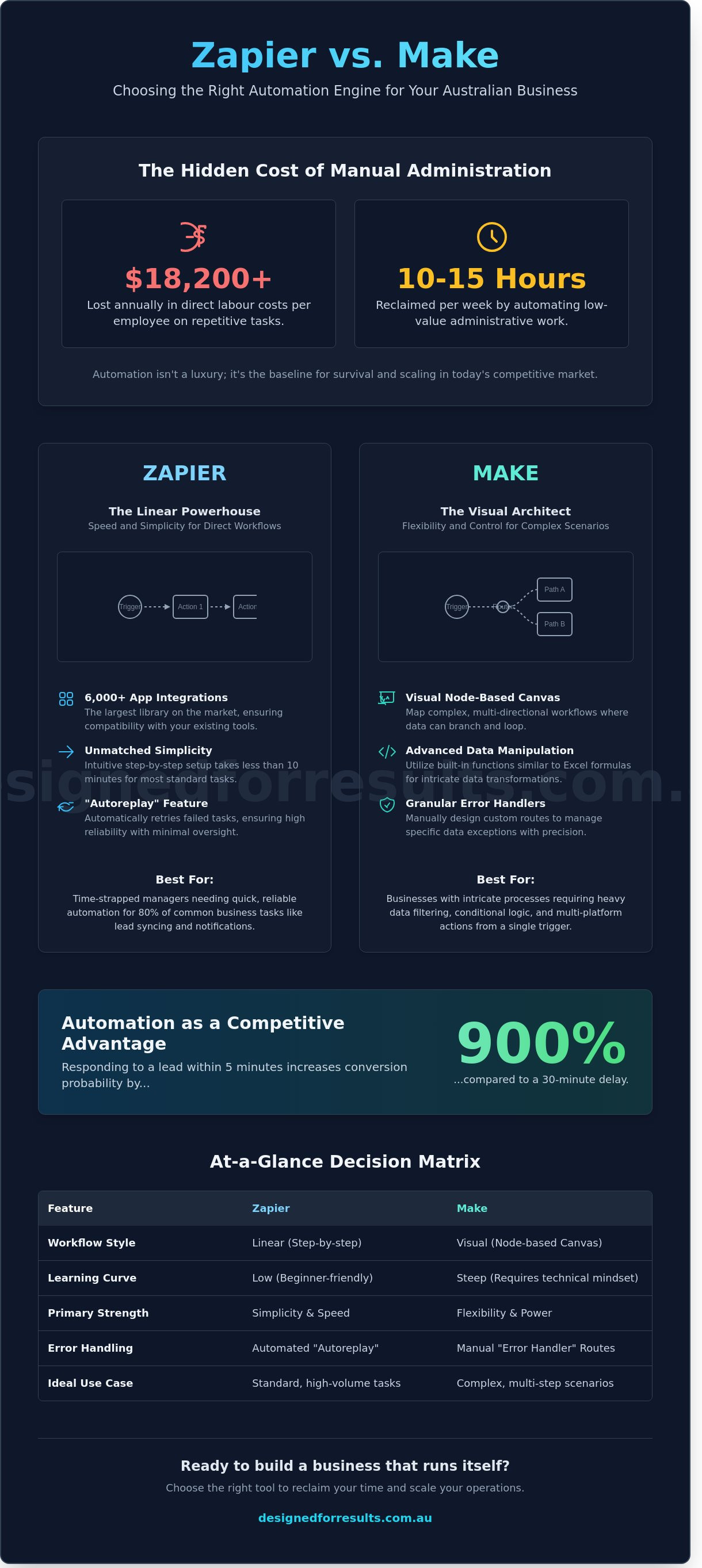
Repetitive data entry drains more than just time. If an administrator earning $35 per hour spends 10 hours weekly on manual invoicing, the business loses over $18,200 annually in direct labour costs. This inefficiency creates a growth ceiling where the owner cannot accept new clients because the administrative load is too heavy. Integrating smart AI solutions with standard workflows removes these barriers. These tools handle the cognitive load of sorting information, allowing the business to expand without a proportional increase in headcount.
Automation as a Competitive Advantage
Speed-to-lead is a critical metric for service-based businesses. Statistics from 2024 indicate that responding to a lead within five minutes increases conversion probability by 900 per cent compared to a 30-minute delay. Automated responses ensure that every enquiry receives an immediate, professional touchpoint. Standardising the customer journey through automation eliminates the variability that leads to inconsistent service delivery.
Precision in document generation and invoicing removes the risk of human error. This accuracy builds client trust and ensures financial health. The ongoing comparison of zapier vs make often centres on which platform provides the most reliable connection for these vital processes. Selecting the right tool is a foundational decision that secures your operations and provides the clarity needed for long-term execution.
Structural Differences: Linear Workflows vs Visual Scenarios
The fundamental architecture of your automation platform dictates how effectively you can reclaim your evenings from administrative tasks. When evaluating zapier vs make, the primary distinction lies in how they visualise and execute data movement. Zapier utilizes a vertical, step-by-step approach. It functions as a linear checklist where a single trigger leads to a sequence of actions. This structure provides immediate clarity for Australian business owners who need to automate straightforward processes, such as sending a welcome email after a website enquiry.
Make adopts a visual, node-based canvas. It allows users to map out complex processes by connecting modules in a web-like structure. This spatial layout enables the creation of multi-directional workflows where data can branch off into different paths based on specific filters. While Zapier excels at moving data from point A to point B, Make is designed for those who need to coordinate data between multiple systems simultaneously. Reliability remains high on both platforms; however, Zapier offers an automated "Autoreplay" feature on its Professional plans to handle task failures, whereas Make provides granular "Error Handler" routes to manage specific data exceptions manually.
The Zapier Experience: Speed and Simplicity
Zapier is built for the time-strapped manager who requires functional automation without a steep learning curve. The platform offers access to over 6,000 app integrations as of 2024, the largest library in the automation market. Setting up a "Zap" often takes less than ten minutes because the interface guides you through a rigid, logical sequence. You select a trigger, choose an action, and test the connection. This simplicity is a significant advantage when your business needs involve standard tasks like syncing Shopify orders with Xero or adding new leads to a Mailchimp list. For many, the ability to deploy a solution quickly outweighs the need for advanced logic.
The Make Experience: Flexibility and Complexity
Make provides a level of technical depth that suits businesses with intricate operational requirements. The visual builder allows you to see the exact path data takes through your system. You can use routers to split a single workflow into multiple branches, ensuring that high-value leads are prioritised differently than general enquiries. Make facilitates advanced data manipulation through its built-in functions, which operate similarly to Excel formulas. This flexibility allows for the consolidation of several separate Zapier workflows into one single "Scenario." While the learning curve is steeper, the result is a sophisticated system that can handle complex administrative burdens. For those requiring a tailored setup, bespoke AI automation ensures your systems work in harmony.
Choosing between these structures depends on your specific business volume. Zapier’s linear model is highly effective for 80% of common service-based tasks. Make becomes the logical choice when your internal processes require heavy data filtering or when you need to perform multiple actions across different platforms from a single initial trigger.
Analysing the True Cost: Pricing Models and Integration Depth
Selecting an automation platform requires a clinical look at how usage translates into monthly overheads. When comparing zapier vs make, the fundamental difference lies in how they quantify work. Zapier utilizes a task-based model where you only pay for successful actions. If an automation triggers but a filter stops it from proceeding, you aren't charged. This predictability benefits Australian businesses managing high-value, low-volume leads where every successful execution represents a clear win for the bottom line.
Make operates on an operation-based system. Every single module in a scenario that performs an action, including data searches that return no results, consumes an operation. While this sounds punitive, the unit cost is significantly lower. For example, a business processing 10,000 operations on Make might pay approximately $15 AUD per month, whereas 10,000 tasks on Zapier can exceed $150 AUD. This price gap makes Make the logical choice for data-heavy processes like syncing inventory across multiple e-commerce stores or managing high-frequency administrative updates.
Hidden costs often reside in "premium" app connections. Zapier restricts certain high-demand tools, such as Salesforce or Zendesk, to its higher-tier plans. Australian business owners must also factor in the cost of maintenance. A complex automation that breaks requires billable hours to fix. Zapier’s interface is designed for rapid troubleshooting, potentially saving two to three hours of developer time per month compared to the more technical environment of Make.
Budgeting for Growth
Small businesses in Australia typically start with basic lead capture. Zapier’s starter plans begin around $30 AUD per month, providing a low-friction entry point. The tipping point occurs when your business scales beyond 2,000 tasks monthly. At this stage, the financial efficiency of Make becomes undeniable. Businesses should audit their task volume quarterly to ensure their subscription remains a high-yield investment rather than a mounting expense. Recovering 10 hours of admin time per week justifies a $50 AUD monthly spend, provided the system requires minimal intervention.
Integration Ecosystems
Native support for Australian-specific tools like Xero, MYOB, and ServiceM8 is non-negotiable for local service providers. Zapier leads the market with over 6,000 native integrations, ensuring that most off-the-shelf software connects without custom code. This plug-and-play capability allows owners to reclaim their evenings by automating quote follow-ups and invoicing immediately. Make supports fewer apps natively but offers a robust HTTP tool to connect to any software with an open API. This flexibility is vital for businesses using bespoke AI automation to handle unique workflows that standard apps cannot accommodate. Relying on native connections reduces long-term technical debt and ensures your automations don't break when a software provider updates their system.
Selecting a Platform Based on Business Complexity
Deploying automation requires a clear understanding of your current technical infrastructure and future goals. The decision between zapier vs make often rests on the balance between speed and sophistication. Zapier suits Australian businesses needing to solve immediate admin burdens without hiring a developer. It handles linear tasks with high reliability. Make provides the granular control necessary for complex data manipulation and non-linear workflows. You must match the tool to the complexity of the problem you intend to solve.
Evaluate your team's capability. If you lack in-house technical resources, Zapier's user-friendly interface allows owners to reclaim 10 hours a week without learning code. If your operations involve high-volume data syncing across five or more platforms, Make's visual canvas offers the required depth. Align this choice with your three-year roadmap to ensure your systems scale alongside your revenue. Making the right choice now prevents the need for a costly migration when your business reaches its next growth milestone in 2026.
Use Cases for Zapier
- Lead magnet delivery: Send a PDF guide or pricing sheet within 120 seconds of a website enquiry to ensure you reach the prospect while their interest is peaked.
- CRM entry: Transfer data from website forms into tools like HubSpot or Pipedrive with basic filters to ensure sales teams receive clean data.
- Automated review requests: Trigger a Google Review link via SMS or email exactly 24 hours after a service is marked complete in your scheduling software.
Use Cases for Make
- Document generation: Create 15-page service agreements or contracts using data from a CRM, including specific conditional clauses based on the service package selected.
- Multi-step onboarding: Simultaneously create a project in Asana, a dedicated folder in Google Drive, and a deposit invoice in Xero once a deal is won.
- Support ticket prioritisation: Analyse incoming emails for specific keywords and tag them by urgency in a support tool before alerting the relevant team member.
The choice in the zapier vs make debate depends on your specific operational requirements. If your workflows require "if/then" logic that branches into multiple different outcomes, Make is the superior option. For businesses focused on connecting two or three apps to handle basic data entry, Zapier provides the fastest return on investment. Focus on the outcome you need rather than the features of the software. A well-designed system should run in the background, allowing you to focus on high-level management rather than troubleshooting software connections.
Discover how to build a more efficient operation with bespoke AI and automation tailored to your business needs.
Professional Implementation: Optimising Your Automated Workflow
Setting up a basic trigger is a simple task; building a reliable ecosystem that handles 500 leads monthly without failure requires technical precision. Professional implementation eliminates the risk of broken data pipelines that occur when DIY logic fails during high-traffic periods. Australian businesses often lose 20% of their potential revenue through lead leakage. This usually happens when manual entry fails or basic automations break without sending a notification. Professional builds include advanced error handling to ensure every lead is captured and processed correctly.
Scalability is the primary differentiator between a hobbyist setup and a professional operation. Your systems must handle a 300% increase in volume without requiring a complete rebuild. When evaluating zapier vs make, the decision should rest on your long-term data requirements and the complexity of your internal logic. A professionally designed system moves your business away from manual admin and toward a model where your staff focuses solely on high-value tasks. This transition typically saves business owners 15 hours of administrative work every week.
When to Call in the Experts
Complex logic requires a deep understanding of API documentation and data mapping. If your workflow involves more than three steps or connects disparate databases, seeking professional help saves weeks of frustration. Bespoke AI automation allows you to integrate advanced logic that standard templates cannot handle. Outsourcing the build and deployment reduces the time-to-value, often delivering a fully operational system within 14 days. This speed allows you to see a return on investment through immediate efficiency gains.
Next Steps for Your Business
Start with a comprehensive audit of your current processes. Identify the three repetitive tasks that consume the most time for your team. Mapping these workflows reveals exactly where bottlenecks occur and where automation provides the highest impact. A phased implementation ensures your team adapts to new systems without operational disruption. Once the core automation is live, you can layer in more complex features to further refine the customer journey. If you are ready to reclaim your evenings and focus on growth, let’s chat about your automation needs and how to get your systems working for you.
Take Control of Your Business Operations
Choosing between zapier vs make requires a clear understanding of your current workflow volume and long-term technical goals. Zapier provides immediate connectivity with over 6,000 applications, making it ideal for simple, linear tasks that need to work instantly. Make offers sophisticated visual mapping and advanced logic that can reduce subscription costs by up to 30% for businesses processing high volumes of data. Most Australian business owners we assist currently lose 15 hours every week to manual administration and lead management. Implementing the right automation platform recovers this time, allowing you to focus on high-level management instead of evening data entry.
We specialise in Australian SME automation with a focus on delivering measurable outcomes and total time recovery. Our expertise across both Zapier and Make ecosystems ensures your systems work for you. Stop letting repetitive tasks stall your progress and start operating with precision. You've built a strong foundation; now it's time to let technology handle the heavy lifting.
Book your free automation strategy call today
Your business has the potential to operate at a higher level of efficiency today.
Frequently Asked Questions
Is Zapier or Make easier for a beginner to learn?
Zapier is the more accessible platform for beginners due to its straightforward, linear setup process. Most Australian business owners can configure their first automation in approximately 15 minutes without any technical training. Make requires a visual mapping approach that is more powerful but typically demands 5 to 10 hours of study to master the logic and interface effectively.
Can I use both Zapier and Make in the same business?
You can successfully run both platforms within a single Australian business to capitalise on their unique strengths. Use Zapier for simple, mission-critical tasks like lead notifications where reliability and speed are paramount. Deploy Make for complex, multi-step workflows or high-volume data migrations where cost efficiency is the priority. This dual-platform approach ensures you aren't limited by a single tool's constraints.
Which platform is more cost-effective for high-volume data processing?
Make is the more cost-effective choice for high-volume data processing when comparing zapier vs make. While Zapier charges per successful task, Make charges per operation, which can result in a 60% reduction in monthly software costs for data-heavy workflows. In a 2025 pricing analysis, businesses processing 10,000 monthly records saved over $200 AUD per month by choosing Make over Zapier.
Do these platforms work with Australian software like Xero?
Both platforms offer comprehensive integrations with essential Australian software including Xero, MYOB, and Deputy. Zapier currently supports over 7,000 applications, which allows your CRM to talk directly to your accounting software. Implementing these connections saves the average service-based business owner 8 hours of manual data entry every week, allowing you to reclaim your evenings and focus on growth.
What happens if an automation fails or an app disconnects?
Both platforms include automated error alerts and logs to ensure you can identify and fix issues immediately. Zapier provides an "Autoreplay" feature on its professional plans that automatically retries tasks if a temporary connection error occurs. Make allows you to build specific error-handling routes that can redirect failed data to a Google Sheet, ensuring no customer information is lost during a system outage.
Is my business data secure when using these automation tools?
Zapier and Make provide enterprise-grade security including SOC 2 Type II compliance and end-to-end encryption for all data transfers. They comply with the Australian Privacy Principles, ensuring your client data is handled according to local legal requirements. You can also implement two-factor authentication on both platforms to protect your account, which 90% of security experts recommend as a baseline for business owners.
How much time can I realistically save by automating my admin?
Automating repetitive administrative tasks saves the average Australian business owner between 10 and 15 hours every week. This time is typically reclaimed from manual lead follow-ups, quote generation, and invoice processing. By 2026, service-based businesses using automation are expected to handle 25% more clients without increasing their headcount, directly improving the bottom line and reducing owner burnout.
Should I build my own automations or hire a professional?
Building your own simple automations is a practical way to start, but hiring a professional is necessary for complex, multi-app workflows. A specialist ensures your systems are resilient and properly structured, which prevents the technical errors that often plague DIY setups. Professional implementation typically pays for itself within 4 months by eliminating manual errors and freeing up your time for high-value billable work.
